Know Weather: Live Radar
- 4.5
- Rating
- 5.00M
- Installs
- Free
- Price
 Analysis by App-foxy
Weather apps are easy to judge by their first screen, but the real test comes when I need a useful answer quickly: Should I leave now, delay a walk, carry a coat, or expect a change before I get home? Know Weather: Live Radar, from ReadMore, takes a straightforward place in that decision-making process. It is a free weather app for Everyone, and after spending time with it, I found its main appeal in keeping weather information close and readable rather than turning every forecast check into a complicated research task.
The app is listed in the Weather category and has built a strong audience, with more than five million installs and an average rating of 4.5 from around seventeen thousand ratings. Those figures suggest that its simple promise connects with many people, but they do not remove the need to understand how it fits into your routine. A clean weather screen is useful only when the location is right, the information is current enough for the decision you are making, and you know what to do when the display seems wrong.
Where the experience usually gets stuck
My first practical lesson with a weather app like this is that the most common frustration is not necessarily the forecast itself. It is the chain of small setup decisions around it. If the app opens with an unexpected place, shows information that feels too general, or appears slow to reflect a change, the instinct is to blame the application immediately. In reality, location selection, network access, device settings, and the difference between current conditions and a forecast can all affect what you see.
You May Also Like

 Blood Strike: 2.5 Anniversary
Blood Strike’s Loadouts Turn Every Drop Into a Tactical Gamble
A close look at Blood Strike’s custom loadouts: how fast access to signature weapons reshapes its battle royale rhythm, rewards preparation, and narrows the gap between fights.

 Pandora - Music & Podcasts
Pandora’s Music Is Easy to Start, but Harder to Recover
Pandora’s strength is its low-effort path from a seed to a station. Its weak spot is how much confidence it asks you to place in connection, setup, and quiet recovery.

 8 Ball Pool
 Is Built on Rivalries, Rematches, and Routine
A close look at the rivalries, rematches, shared routines, and unanswered safety questions that turn a quick pool match into a persistent mobile community.

 Samsung Music
’s Quiet Strength Is Playing What You Already Own
Its reach comes less from spectacle than from dependable access to a personal library. That simplicity is both the app’s strongest retention engine and its ceiling.

 AccuWeather: Weather Radar
AccuWeather Review: A Quick, Clear Forecast for Everyday Decisions
For everyday plans, the best forecast is the one you can understand quickly. AccuWeather makes rain timing, radar, and local conditions easy to act on, with a few trade-offs.

 Hill Climb Racing
Why Hill Climb Racing Still Turns Crashes Into One More Run
A tiny car, a bumpy hill and one more upgrade: Hill Climb Racing keeps resurfacing because its simple chaos makes every near-miss feel personal.
More From Our News Desk
View All News


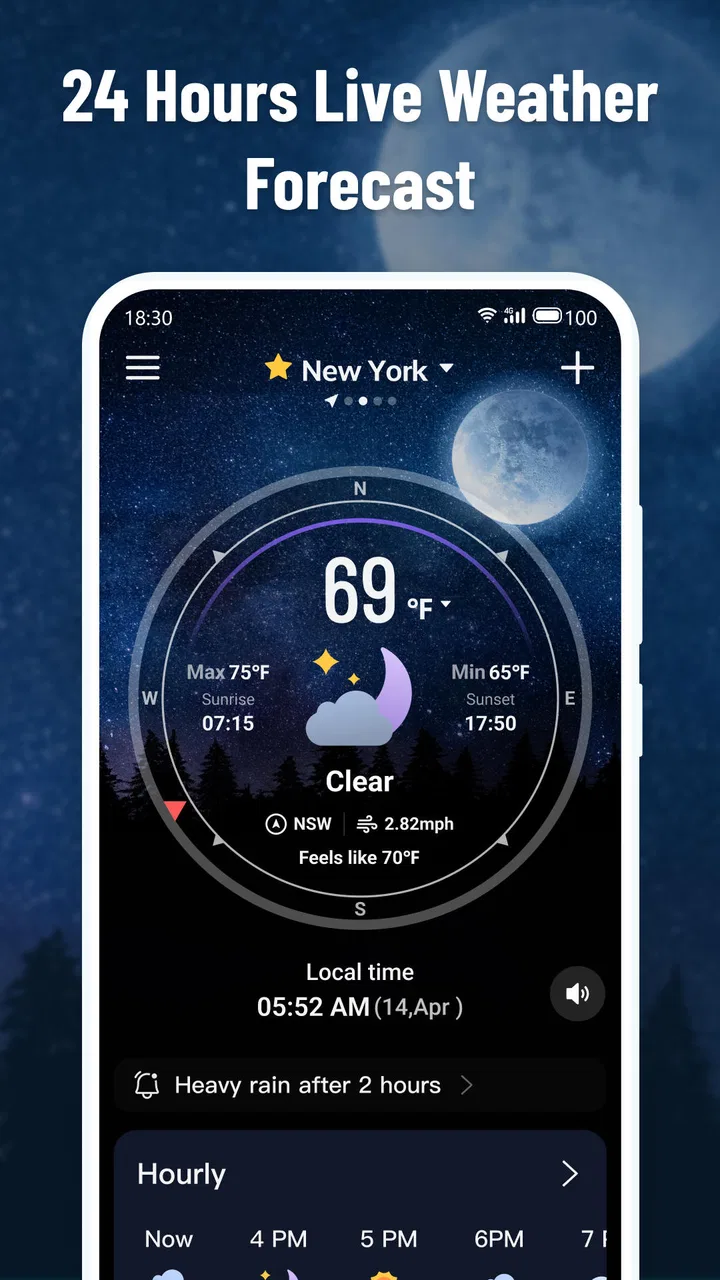
That matters particularly with a title that emphasizes live radar. Radar information is most useful when I am watching nearby movement and trying to understand what may happen next, but it is not a guarantee that every street will experience identical weather. A rain band can weaken, split, or move around a neighborhood. Buildings, hills, coastal effects, and local temperature differences can also make the view feel different from what I see outside. I treat the radar as a visual aid for timing, not as an exact promise.
The app is at its best when I use it for practical questions rather than demanding certainty. Before walking to a station, I might check whether a visible weather system appears to be approaching. Before planning an outdoor errand, I use the broader forecast to decide whether the plan is sensible. For a high-consequence decision, such as travel during dangerous conditions, I would still look at official local warnings as well. A consumer weather app can help me prepare, but it should not replace emergency information.
Another point worth understanding is that a live-looking screen does not mean every piece of information refreshes continuously. The display depends on the service feeding the app and on the phone receiving that information. If I am underground, moving between weak connections, or using a restricted network, the screen may retain older information until communication resumes. That is a normal limitation of mobile weather tools, not evidence that the forecast has suddenly become unreliable.
What I check before judging the forecast
I begin by confirming the place shown on screen. This simple habit prevents a surprising number of bad decisions, especially when I have recently traveled or when the app has selected a nearby location instead of the exact area I had in mind. A nearby town can have a noticeably different shower pattern, wind exposure, or temperature, so I do not assume that a familiar-looking name is close enough.
Next, I check whether the information matches the question I am asking. Current conditions answer “what is happening now?” A forecast answers “what is expected later?” A radar view helps with the movement and shape of precipitation. These are related but different kinds of information. If I use a current reading to plan an evening commute, or interpret a broad forecast as a minute-by-minute guarantee, the problem is my interpretation rather than necessarily the app.
I also give the screen a moment to settle when I have just opened the app. A weather application needs a working connection to retrieve changing information, and a phone that has just switched networks may take longer than usual. I avoid repeatedly closing and reopening it, because that does not improve a weak signal and can make it harder to tell whether the information has actually refreshed.
For people concerned about phone compatibility, the current version is 1.3.2 and it supports Android 7.0 or later. That makes it accessible to many older Android devices, although compatibility on paper does not guarantee an equally smooth experience on every handset. A phone with limited storage, an aging battery, or aggressive background restrictions may behave differently from a newer device. I would update the app through the normal store process and keep the operating system in a supported state before troubleshooting deeper problems.
A setup routine that saves time later
My preferred setup is deliberately boring. I open the app while connected to a stable network, identify the location I actually care about, and then spend a few seconds learning where the current conditions, forecast information, and radar view are presented. That small orientation step pays off when I am in a hurry. I do not want to learn the interface while standing at a bus stop in heavy rain.
If the app asks for a location choice, I consider whether automatic positioning is genuinely useful for my routine. Someone who commutes between several places may benefit from checking each destination manually, while someone who mostly wants conditions at home may prefer a fixed place. The important distinction is control: I want to know which location is being used before I trust the result.
When a screen does not look right, I first verify the basics in a sensible order:
- Confirm the selected location before interpreting any weather detail.
- Check that the phone has a working internet connection rather than only a connection icon.
- Wait briefly after moving from mobile data to Wi-Fi, or the other way around.
- Close and reopen the app once if the display appears stuck.
- Install the latest available app update when an update is offered.
This sequence is more useful than changing several settings at the same time. If I alter location access, network settings, and battery controls together, I lose the ability to tell which change helped. A calm, one-step approach is especially valuable for less technical users, because it avoids turning a simple weather check into a confusing phone repair session.
I would also avoid treating every notification or update delay as a software defect without checking the phone’s own restrictions. Android devices can limit background activity to save battery, and network-saving modes can interfere with timely retrieval. The exact menus differ between manufacturers, so I would look for the app’s battery and data-use controls in the device settings rather than following a generic instruction that may not match the handset.
Recovering a useful workflow when something goes wrong
When the app seems frozen, I use a short recovery routine. First I move to a place with a more dependable connection, then I return to the app and give the page a chance to update. If the information still looks unchanged, I restart the application. Only after those steps would I restart the phone or investigate system-level restrictions. This avoids the common mistake of assuming that a full reinstall is the first solution.
A reinstall can also create unnecessary friction. It may clear local preferences or require me to choose a location again, so I reserve it for repeated crashes or a clearly damaged installation. Before taking that step, I would make sure the device has enough free space and that the operating system meets the app’s minimum requirement. If other applications are also slow or failing to load, the issue is probably broader than this weather tool.
There is a useful distinction between a blank or unresponsive interface and a forecast that simply appears inaccurate. The first may point to connectivity, app state, or device limitations. The second requires comparison with the actual observation and with another trusted source. I do not “fix” an inaccurate-looking forecast by refreshing it endlessly. Weather prediction is inherently uncertain, and radar interpretation has limits even when the software is operating normally.
One of the more practical ways I use the app is as part of a two-check routine. I look once before leaving home, then again shortly before an outdoor activity if conditions are changing. The first check helps me pack or dress appropriately; the second helps me decide whether timing needs to change. This is more realistic than expecting one morning forecast to answer every question for the entire day.
For example, imagine I am planning to walk to a supermarket after work. I check the selected destination rather than relying on my home location, review the expected conditions for the relevant period, and use the radar view to see whether precipitation appears to be moving toward the route. If the display is slow, I confirm the network before making a decision. I might leave earlier, bring rain protection, or choose another form of transport, but I would not assume that a colored patch on a map means every part of the route will be equally wet.
That workflow reveals both a strength and a weakness. The strength is that the app can support quick, visual decisions without forcing me to consult a long technical forecast. The weakness is that the user still has to interpret the information responsibly. Someone wanting a fully explained meteorological briefing may find this approach too lightweight, while someone who only needs a fast glance may appreciate not being buried in detail.
When the app is not the cause
Weather information comes from external observation and forecasting systems, so a sudden mismatch between the screen and the sky is not automatically a failure by ReadMore. Local conditions can change faster than a general forecast, and the nearest reporting area may not represent a precise home address. I pay attention to that distinction before leaving a negative judgment about the app’s reliability.
Location errors are another frequent source of confusion. A phone may estimate position using different signals, and a device indoors or in a dense urban area may choose a broader nearby area. If the app consistently opens to the wrong place, I would check the phone’s location setting and then use a deliberate location choice if the interface allows it. I would not keep refreshing the same incorrect location and expect the forecast to correct itself.
Network behavior can also be misleading. A phone may show strong Wi-Fi while the connection itself has lost access to the internet. Conversely, mobile data may be available but slow enough that updated weather information takes time to arrive. Testing another ordinary application is a quick way to separate an app-specific problem from a general connection issue. If several services fail, troubleshooting the network makes more sense than reinstalling Know Weather: Live Radar.
There are situations where I would choose a different type of weather source. For severe weather, I prefer official alerts from the relevant authorities because those notices are designed for safety and action. For aviation, marine activity, farming, or detailed professional planning, a specialist service may provide more appropriate information. For a casual commute, a school run, or deciding whether to take an umbrella, this app is a more comfortable fit.
It is also not the ideal choice for someone who dislikes visual interpretation. Radar maps can be engaging, but they require a little judgment about direction, timing, and distance. If I want the app to explain every change in plain language or provide a deep historical analysis, I would look for a more specialized alternative. The value here is speed and accessibility, not a complete replacement for every weather resource.
Who will get the most from it
I think the app suits people who want a free, uncomplicated weather companion and are willing to spend a moment checking that the location and context are correct. It is particularly useful for everyday planning: walking, commuting, shopping, taking children outdoors, or deciding whether a short trip should happen now or later. The Everyone age rating also makes it a reasonable option for households looking for a straightforward weather tool rather than a specialist product.
Its broad reach is reflected in the fact that it has passed five million installs, while the 4.5 average from roughly seventeen thousand ratings indicates a generally positive reception. I see those numbers as evidence that the basic experience is approachable, not as proof that it will suit every weather need. The app’s usefulness still depends on how much detail I expect and how carefully I interpret changing conditions.
ReadMore has kept the product accessible by offering it free, which removes the usual barrier to trying it. That makes experimentation easy: I can compare its presentation with the weather source I already use and decide whether the radar view improves my routine. I would judge it after several different conditions rather than after one forecast, because a single calm day does not reveal how helpful the app is when weather changes quickly.
On the other hand, users who need guaranteed alert delivery, advanced forecasting tools, or professional-grade local detail should not make this their only resource. The app can be part of a sensible information routine, but it is not a substitute for official warnings or specialist services. That is not a criticism unique to this product; it is an important boundary for consumer weather applications generally.
My practical verdict after using it
Know Weather: Live Radar is a sensible choice when I want weather information that is quick to open and easy to use for ordinary decisions. Its free price, broad device support from Android 7.0 onward, and clear focus on weather make it approachable. The current version, 1.3.2, is the one I would use when evaluating the experience today, and the 4.5 average shows that many users find the overall package worthwhile.
My recommendation comes with one condition: use it as a decision aid, not as an unquestionable prediction machine. Confirm the location, distinguish current conditions from forecasts, give the connection time to update, and treat radar as an indication of movement rather than a promise for one exact street. Those habits solve much of the friction that users may initially blame on the app.
The strongest reason to try it is practical clarity: it can help turn a vague “what is the weather doing?” question into a quick plan for the next part of the day. I would install it for commuting, errands, and outdoor planning, especially if I prefer a visual weather check over a dense technical report. I would pair it with official alerts for serious conditions and choose a specialist alternative for professional needs. Used within those limits, it is an easy recommendation to a friend who wants a free weather app without unnecessary complexity.
FAQs for Know Weather: Live Radar
01What is Know Weather: Live Radar, and what does it offer?
Know Weather: Live Radar is a weather app designed to provide current conditions, forecasts, and radar-based weather information in one place. During testing, its main value was the combination of quick daily updates with visual radar data, helping users follow rain and storm movement. It can be useful for planning commutes, outdoor activities, travel, and changing weather conditions.
02Does Know Weather: Live Radar provide accurate and reliable forecasts?
The app presents weather information from available meteorological data sources, but forecast accuracy can vary depending on location, local geography, and how far ahead you look. Short-term conditions and radar views are generally more useful for immediate planning than long-range predictions. Users should still compare severe-weather information with official local alerts, especially during dangerous storms or emergencies.
03Does the app require location access to work?
Know Weather: Live Radar can typically be used by searching for a city or location manually, but allowing location access makes the experience more convenient by showing weather for your current area. You can usually choose whether access is granted only while using the app or continuously. If privacy is important, manual location selection is a practical alternative to permanent location tracking.
04Are there advertisements, subscriptions, or paid features?
The available features, advertising, and pricing may depend on the version of Know Weather: Live Radar installed and the platform you use. Some weather applications provide basic forecasts for free while placing advanced radar layers, extended forecasts, or an ad-free experience behind a subscription or one-time purchase. Check the current store listing before downloading so you understand any optional costs.
05Is Know Weather: Live Radar suitable for severe-weather monitoring?
The radar and alert-related tools can help users observe developing rain, storms, and other weather patterns, but the app should not be treated as the only source of emergency information. For hurricanes, tornadoes, flooding, lightning, or other serious threats, rely on government weather services and local emergency notifications. Enable alerts carefully, keep notifications permitted, and verify warnings for your exact location.
Pros
- Clear live radar maps with useful precipitation tracking.
- Accurate hourly and daily forecasts for planning ahead.
- Weather alerts help users prepare for severe conditions.
- Clean interface makes key information easy to find.
- Supports multiple locations for travel or family monitoring.
Cons
- Some advanced radar features may require a subscription.
- Forecast accuracy can vary by location and weather conditions.
- Live radar may use significant mobile data over time.
- Frequent notifications can feel excessive without customization.
- Some regions may have limited radar coverage or detail.

Know Weather: Live Radar
Gallery